Marketplace Stores: Connecting Shopee and TikTok Shop / Tokopedia (Guide and FAQ)
Marketplace Stores connects Shopee and TikTok Shop (including Tokopedia) stores to Acosys: marketplace products are matched to Acosys products, warehouse stock is sent to the marketplace, and orders ready to ship become Sales Orders in Acosys. This page explains how to use it and answers common questions.
What do I need before starting?
- The Marketplace add-on active on your Acosys Cloud subscription. Contact the Acosys team through Contact to activate it. Self-hosted installations are not supported yet.
- A user role that holds the menu Sales & POS / Online Shop / Marketplace Stores (administrator holds it by default).
- A Shopee or TikTok Shop seller account allowed to authorize third-party apps. One TikTok Shop authorization covers both the TikTok Shop and Tokopedia store.
- Acosys product codes equal to the Seller SKU in the marketplace, so products are matched automatically. Products with different codes can still be matched by hand.
Connecting a store

- Open Sales & POS / Online Shop / Marketplace Stores (Shopee, TikTok Shop / Tokopedia).
- Click Connect Shopee or Connect TikTok Shop / Tokopedia. The marketplace authorization page opens in a new tab.
- Sign in with the seller account, review the requested permissions, then approve. The authorization link is valid for 30 minutes.
- A Store connected page appears. Close that tab, return to Acosys, then click Reload. The store appears with status Active, the authorization expiry, and the number of matched products.
One marketplace store can be linked to only one Acosys account. One Acosys account may link several stores.
Store settings
Click Manage on the store row. These settings decide who orders are recorded for and which warehouse stock is counted from.
| Field | Purpose |
|---|---|
| Customer for marketplace orders | The customer used for every Sales Order from this store. The recipient name and address are written in Shipped To on the Sales Order. Required before pulling orders. |
| Sales rep | Sales Representative on the Sales Order. If empty, the first active sales rep is used. |
| Division and Department (warehouse) | The warehouse stock is sent from, and the division and department of the Sales Order. Required before pulling orders; the division is required for sending stock when the company has more than one division. |
| Safety stock | Quantity held back and not offered on the marketplace. |
| Send stock to marketplace | Must be on before stock can be sent. |
Products and matching
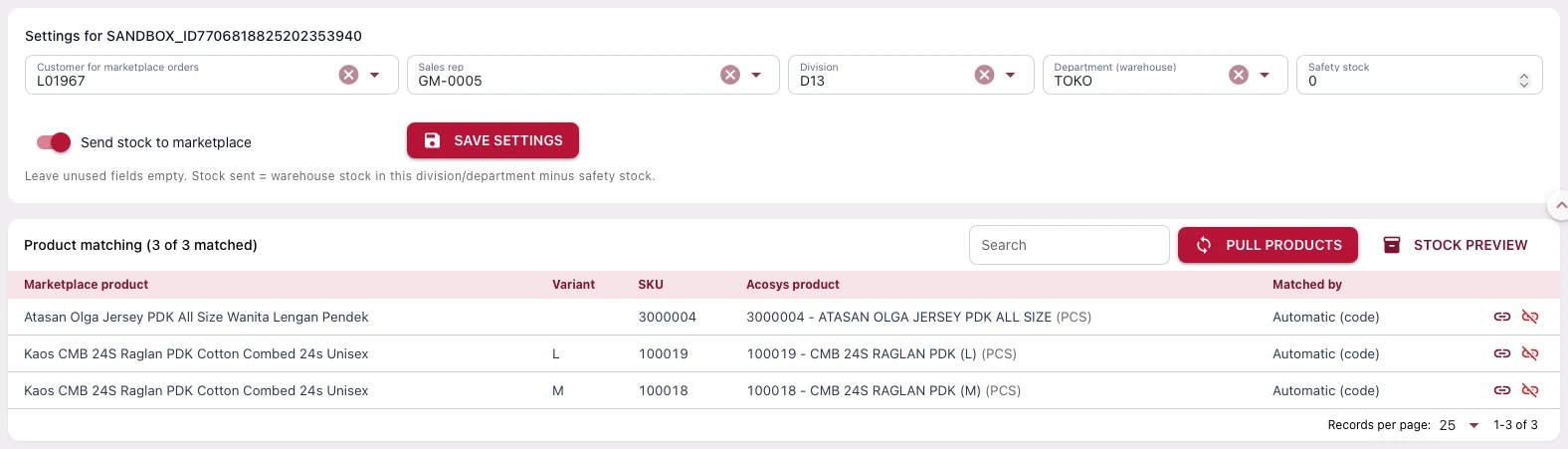
- Click Pull Products. Acosys reads every product and variant of the store (Shopee: items and models; TikTok Shop: products and SKUs).
- Variants whose Seller SKU equals a Acosys product code (or its alias, when only one product has that alias) are matched automatically with the product base unit.
- Unmatched variants are marked red. Click the link icon on the row to pick the product and unit by hand, or the unlink icon to remove a match.
- Manual matches are never overwritten by a later product pull. Variants deleted on the marketplace disappear from the list.
Sending stock to the marketplace
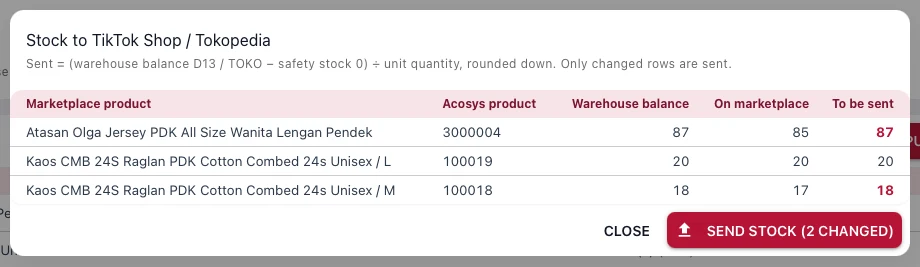
- Click Stock Preview. Acosys reads the marketplace stock at that moment and shows it next to the stock to be sent.
- Stock sent = (warehouse balance in the store division/department up to today − safety stock) ÷ quantity of the matched unit, rounded down, minimum 0.
- Click Send Stock. Only rows whose number differs are sent. Rejections from the marketplace are recorded per row.
A Sales Order does not reduce stock; stock goes down when the invoice or delivery is made, so send stock after that. Shopee rejects stock below the quantity currently on order. On TikTok Shop the stock is written to the store default sales warehouse.
Orders become Sales Orders

Click Pull Orders. Acosys reads orders changed since the last pull (first pull: the last 7 days) and acts on each according to its marketplace status.
| Marketplace status | What happens in Acosys |
|---|---|
| Unpaid, on hold (UNPAID, ON_HOLD, IN_CANCEL) | Only recorded in the Orders table, no Sales Order yet. |
| Ready to ship through completed (Shopee READY_TO_SHIP onward; TikTok AWAITING_SHIPMENT onward) | A Sales Order is created once, for the marketplace customer, with the order date and time and the price paid by the buyer. The memo holds SHOPEE, TIKTOK SHOP, or TOKOPEDIA and the order number. |
| Cancelled before the Sales Order is processed | The Sales Order is marked Cancelled and no longer appears when searching orders for invoices or deliveries. |
| Cancelled or returned after invoicing or delivery | The Sales Order is not changed; the order is flagged Needs attention. Settle it with a Sales Return. |
The same order never creates a second Sales Order, however many times it is pulled. If an SKU is not matched, that order gets no Sales Order and the message shows in the table; match the product, then click Pull Orders again.
Processing a Sales Order from the marketplace
- A Sales Order from the marketplace is processed like any other: pulled into an invoice on the Sales form with Fill Data from Sales Order, into a Delivery Order, or into the POS.
- Shipping labels and waybills are still handled in the marketplace Seller Center.
Frequently asked questions
- Do orders arrive automatically? Not yet. Orders arrive each time Pull Orders is clicked. Automatic pulling is being prepared.
- Is Tokopedia supported? Yes, through the TikTok Shop authorization: Tokopedia orders carry the memo TOKOPEDIA.
- How do I disconnect? Revoke the Acosys app authorization in the Seller Center: on TikTok Shop in the app authorization settings, on Shopee under Platform Partner. After that, Acosys stops reading that store data.
- How long is the authorization valid? Shopee at most 365 days (the seller can choose shorter); TikTok Shop for the period granted. The limit shows in the Authorization valid until column. Reconnect the store to extend it.
- Why is a product not matched automatically? The Seller SKU in the marketplace is empty or not equal to the Acosys product code, or its alias is used by more than one product. Align the code and pull products again, or match by hand.
- Why is the stock sent 0? The warehouse balance in the store division/department really is 0, the safety stock is larger than the balance, or the division/department in the store settings is not where the goods are kept.
- Are marketplace fees recorded? Not yet. The Sales Order uses the price paid by the buyer; service fees, shipping, and marketplace payouts are recorded by the store.
- What data does Acosys read? Only the store data the seller authorizes: store information, products and stock, and orders. Details are in the [Privacy Policy](https://acosys.co.id/en/page/privacy-policy).
- Need help? Contact the Acosys team through Contact.
Menu Location
- Sales & POS / Online Shop / Marketplace Stores (Shopee, TikTok Shop / Tokopedia)
/marketplace